FIRS E-Invoicing Process
Flow

This guide provides a clear overview of the end-to-end lifecycle of FIRS-compliant e-invoicing
using the eTranzact platform.

We support businesses in two capacities:

As an Access Point Provider (APP)

Fully managed, API-based solution.

As a System Integrator (SI)

Flexible control for developers.

ERP Integration

ERP Compatibility

Our solution integrates seamlessly with leading ERP systems to
minimize disruption and accelerate adoption. Supported systems
include but not limited to:

  • Microsoft Dynamics 365
  • Sap
  • SAGE
  • Credo
  • ...and many more.

This flexibility ensures that businesses can leverage their
preferred ERP while maintaining full FIRS compliance.

msdynamic sage sap credo

What You Need to Get Started

illustration
  • ▪ An ERP system capable of API calls and webhooks.
  • ▪ Invoice payloads with:
    • TINs (supplier and buyer).
    • Item details, tax breakdown, amounts.
    • Proper references (IRN, billing, dispatch, etc.)
  • ▪ Ability to embed Base64 QR Code in ERP Solution or
    Invoicing system.
  • ▪ Access to our sandbox environment for testing.

Key Stakeholders in the Flow

  • Supplier ERP - The supplier's system that creates and sends the invoice
  • eTranzact APP - The middle system that processes invoices between Tax payer system and FIRS
  • FIRS - Tax authority system that verifies and archives invoice details.
  • Buyer APP - The buyer's system that receives, verifies, and stores transmitted invoices
  • Buyer ERP and Email: Records and notifications for final notification.
illustration

Full Process Flow Overview

01

Invoice Creation (ERP System/Tax Payer System)

  • ▪ Your ERP Generate the following:
  • - Invoice Number.
  • - Time-stamp.
02

IRN Generation and Validation

  • ▪ERP sends data to our API for IRN creation.
  • - Invoice Number.
  • - Time Stamp.
  • - Service ID.
  • - Business ID.
  • ▪ We check if IRN already exists
  • If yes: return immediately.
  • If no: generate and validate IRN with FIRS.
  • ▪ Response: Success or detailed error for retry.
03

QR Code Generation +
Cryptographic Signing (Optional)

  • ▪ ERP sends QR request to our API.
  • ▪ We validate the payload.
  • If valid:
  • - We generate digital signature + Base64 QR code.
  • - Return for ERP to embed in the invoice document.
04

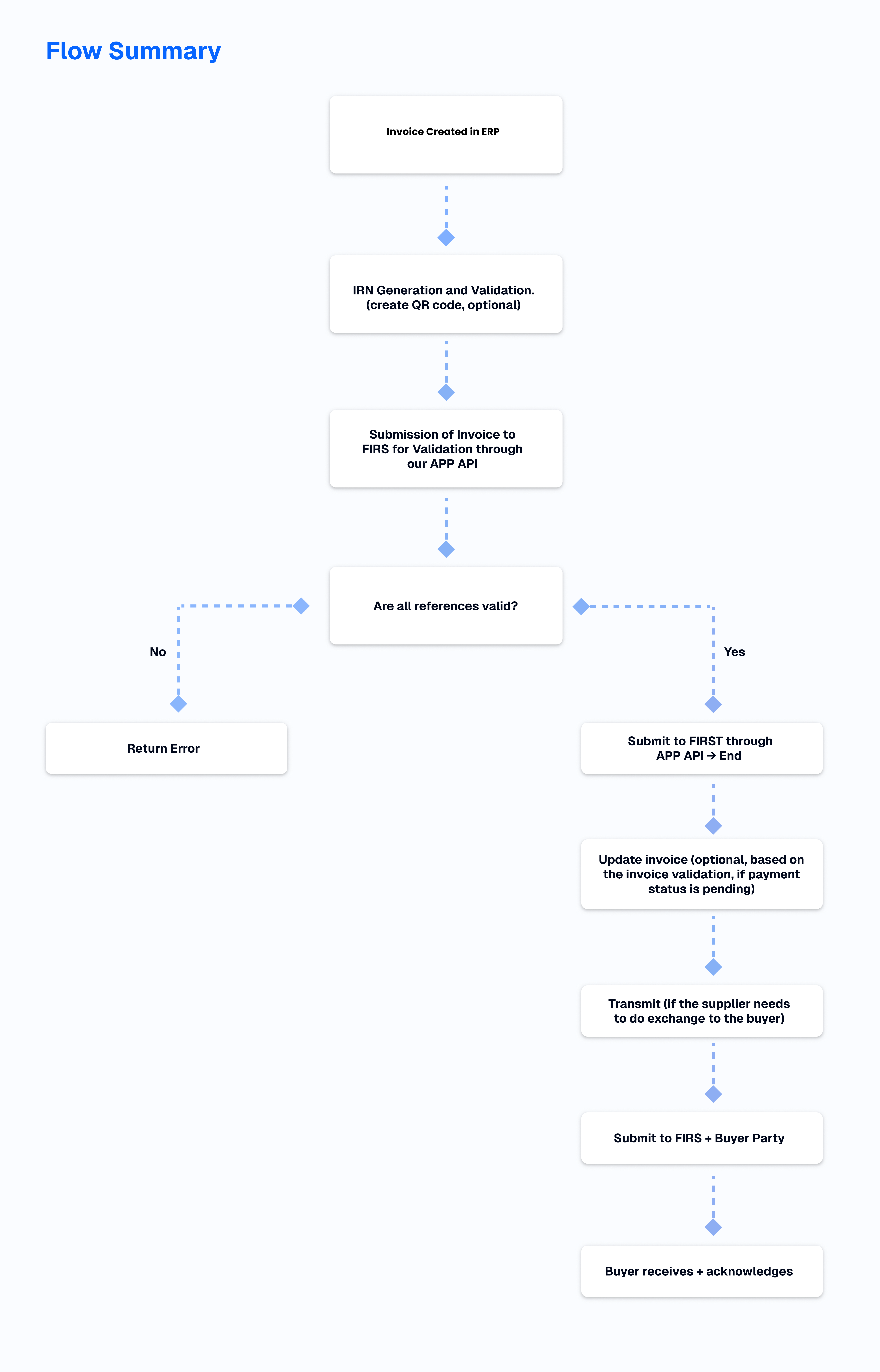
Invoice Submission to FIRS for Validation

  • ▪ ERP sends a validate + sign request.
  • ▪ We check if already signed in cache.
  • If signed: return success.
  • If not:
  • Validate presence of BillingRef, OrderRef,
    BuyerRef, DispDocRef and other parameters
    in the scheme to ensure conformity with FIRS
    standard.
  • -Sign, forward to FIRS and log to cache.
05

Invoice Updates (Payment Status Re-submissions)

  • ▪ ERP sends a corrected invoice payload with same IRN.
  • ▪ We validate and resend to FIRS.
  • If yes: return immediately.
  • If rejected: return error with explanation.
  • ▪ Buyer is notified of update.
06

Invoice Transmission

  • ▪ Once IRN is validated.
  • ▪ Transmit to FIRS.
  • ▪ FIRS route transmission request to buyer's APP.
  • ▪ Buyer receives and acknowledge receipt.
  • ▪ Supplier receive's buyer's acknowledgement.
flow summary

Benefits

Our key Benefits

Single point of API integration

Full FIRS compliance:
IRN, QR Code, digital signing

Buyer delivery + real-time acknowledgment

Seamless compliance:
Each taxpayer's system is configured
to meet FIRS standards out of the box.

Hosted, secure, and scalable
infrastructure

Dedicated Customer Support

Integration Best Practices

Integration Best Practices
  • Ensure that all invoices include:
  • Unique IRN.
  • Required references: BillingRef, OrderRef, BuyerRef etc.
  • Accurate Buyer/Seller TINs.
  • Invoice total + tax breakdown.
  • Valid timestamps.
  • Proper product map code.
  • Proper Service and tax category code.

See what eTranzact can do for you.

Learn how our platforms can increase the strategic impact of your team and future-proof your company.

eTranzact

Want to connect with us?
Find us on social media.

Products

Resources

Company

Company

4th & 5th Floor Fortune Towers,
27/29 Adeyemo Alakija Street,
Victoria Island,
Lagos, Nigeria.

CBN Licensed by Central Bank of Nigeria